
Clover Alerts
Introducing Clover Analytics: Merging Website Traffic and Advertising Data

Christina Anthony
Product Marketing Specialist
See the Website Activity Your Advertising Helps Create with Clover Analytics
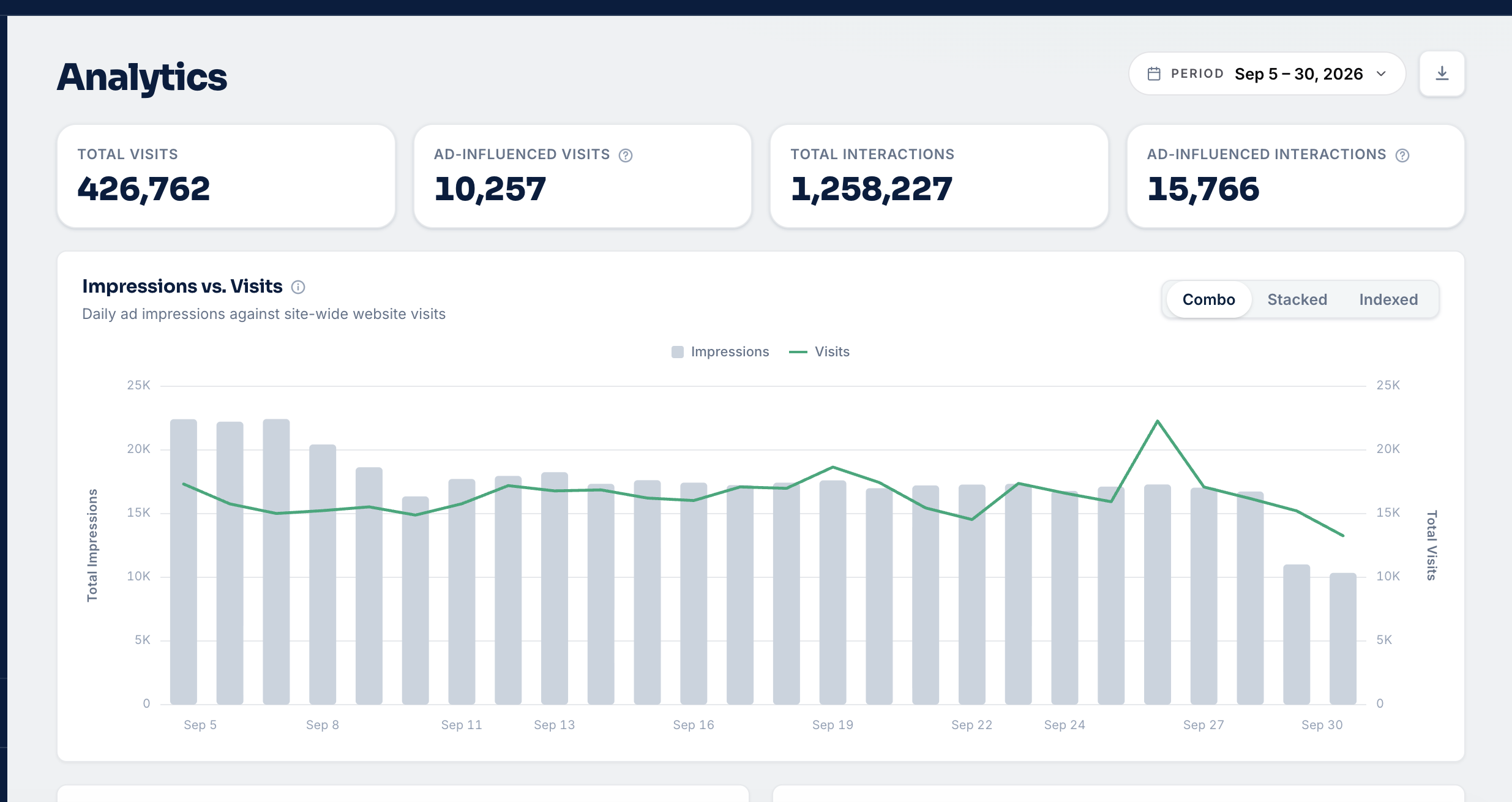
Your marketing decisions are easier when website activity and advertising performance are viewed together. Clover Analytics gives you a clear view of website visits, shopper interactions, and the role advertising plays in driving both.
Available in the Clover dashboard under Analytics, the new experience brings key engagement signals into one focused view. You can quickly understand what is happening on the website, identify which channels are creating meaningful activity, and have more confident conversations about where to focus budget, messaging, and follow-up.
A clearer view of advertising influence
Clover Analytics begins with four summary tiles that provide an at-a-glance performance snapshot:
Total visits: The overall volume of website visits.
Ad-influenced visits: Visits connected to or influenced by advertising activity.
Total interactions: The volume of tracked shopper actions.
Ad-influenced interactions: Shopper actions connected to or influenced by advertising.
Together, these metrics help you move beyond impression counts and understand how advertising contributes to real website engagement.
Connect impressions with website visits
The Impressions vs. Visits chart helps you compare advertising exposure with website traffic over time. Three viewing options make it easier to interpret the relationship from different perspectives:
Combo: View impressions and visits together in one combined chart.
Stacked: Compare the relative contribution of each metric over time.
Indexed: Compare directional trends when the metrics have different scales.
These views help you spot changes in traffic, understand performance patterns, and connect campaign activity with movement on the website.
Understand where traffic comes from
The Website Visits card breaks down website activity by channel, giving you a simple way to see where visits originate:
Paid Search
Direct
Organic Search
Referral
Social
This channel-level perspective helps you compare traffic sources and identify which channels are contributing most to overall website activity.
See what shoppers do after they arrive
The Website Interactions card organizes key shopper actions so you can understand how visitors engage with the site. Tracked actions include:
Vehicle Detail Page (VDP) views
Search Results Page (SRP) views
Specials page visits
Service page views
Click-to-call actions
Hours and directions views
Form submissions
Copied phone numbers
These actions provide useful context for evaluating the quality of website engagement—not just the number of visits. You can use them to identify which campaigns and channels are generating deeper shopper activity.
Keep reporting context as you explore
Clover Analytics shares advertiser, multi-advertiser, and date-range controls with Reporting. Selections remain available as users move between views, making it easier to compare performance without repeatedly rebuilding the same report.
Data interpretation: When tracked visit data drops out while impressions continue serving, Clover Analytics treats the affected period as a gap and estimates the visit trend rather than presenting the tracking interruption as a genuine performance decline.
Built for better performance conversations
Clover Analytics helps you answer practical questions quickly: How much website activity are we seeing?
How much of that activity is connected to advertising?
Which channels are driving visits?
What actions are shoppers taking once they arrive?
Where should we focus budget, messaging, or follow-up?
By bringing these answers together, Clover Analytics turns complex website and advertising data into a clearer story that you can use to guide next steps.
Ready to gain full visibility into your advertising impact? Schedule a demo today and see how Clover Analytics can transform your dealership’s marketing performance.